
Practical AI workflow examples
The examples below show how AI Pathways can turn business conversations, documents, recordings, and workflows into structured outputs.
These are not the main advisory offer. They are practical examples of what becomes possible once the right business process has been identified.
Start with advisory first. Then decide which workflow, tool, or automation is actually worth building.
MultiBrief – Conversation to Structured Outputs
MultiBrief turns spoken conversations into structured, usable documentation. You can record directly or upload existing audio or transcripts, and MultiBrief converts them into summaries, reports, and organised notes in minutes.
What to provide:
Provide a recording or transcript of your conversation, meeting, site visit, or voice notes. Speak clearly and describe what you see or discuss as you normally would during the conversation or inspection.
What you get:
• Meeting summaries
• Inspection or site visit reports
• Interview notes
• Action items and follow-ups
• Structured notes for reference
MultiBrief is designed for situations where information is captured verbally and later needs to become usable written documentation without rewriting.

Voice recordings → structured documentation
〰️
Meeting summaries in minutes
〰️
Inspection notes converted to reports
〰️
Capture information while you work
〰️
Turn conversations into structured outputs
〰️
Customisable report structures
〰️
Designed for real-world workflows
〰️
Voice recordings → structured documentation 〰️ Meeting summaries in minutes 〰️ Inspection notes converted to reports 〰️ Capture information while you work 〰️ Turn conversations into structured outputs 〰️ Customisable report structures 〰️ Designed for real-world workflows 〰️
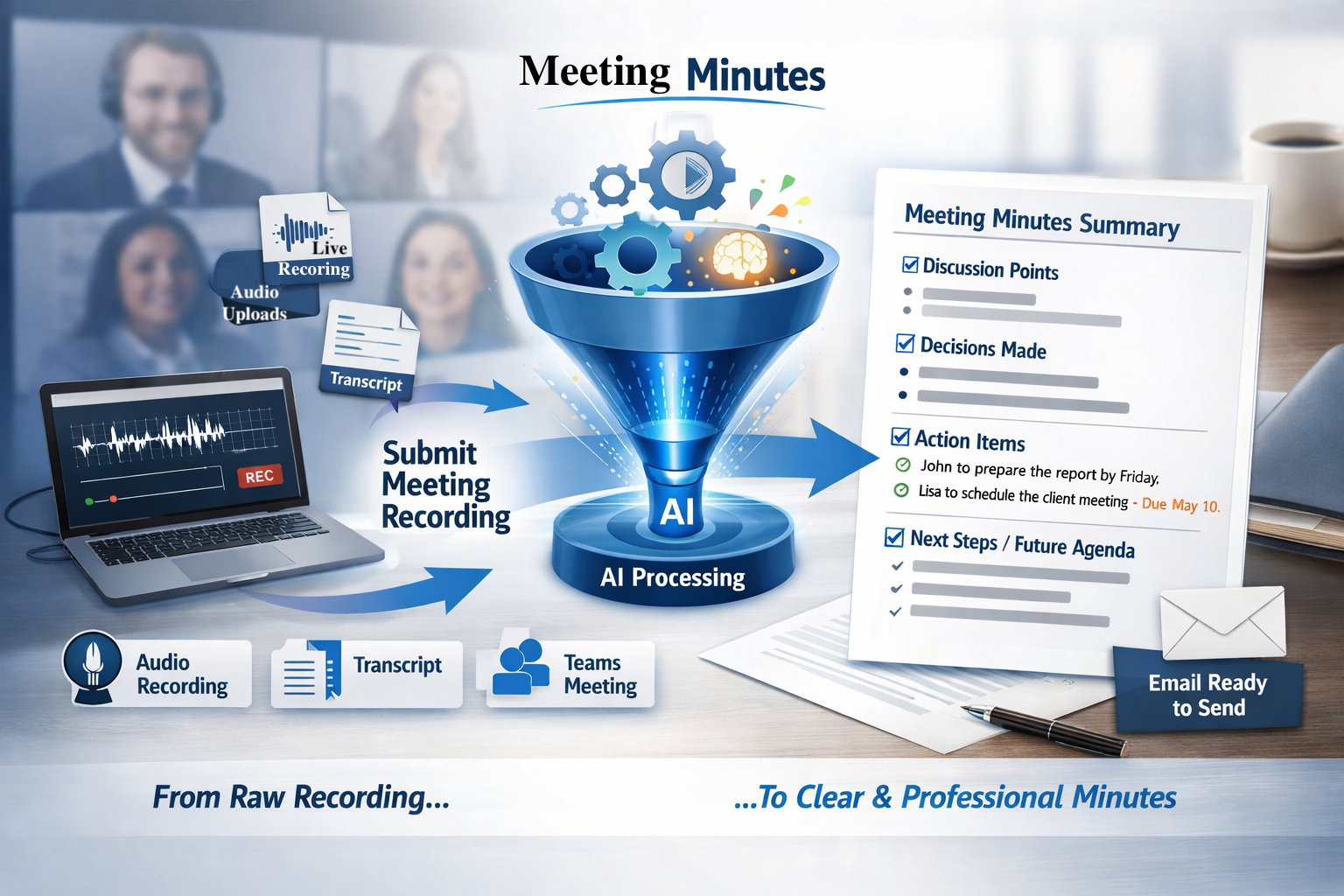
Automated Meeting Minutes
Description:
The Meeting Minutes workflow converts meeting recordings or transcripts into professional meeting minutes. It focuses on capturing the key discussion points, decisions made, and actions agreed upon.
What to provide:
Upload a meeting recording or transcript. If possible, clearly state agenda items, decisions, and assigned actions during the meeting so they can be captured accurately.
What you get:
• A structured meeting summary
• Key discussion points
• Decisions made
• Action items with context
This product is suitable for team meetings, client meetings, and formal discussions where accurate minutes are required.
Residential Property – Inspection to Strategy & Market Evidence
Description:
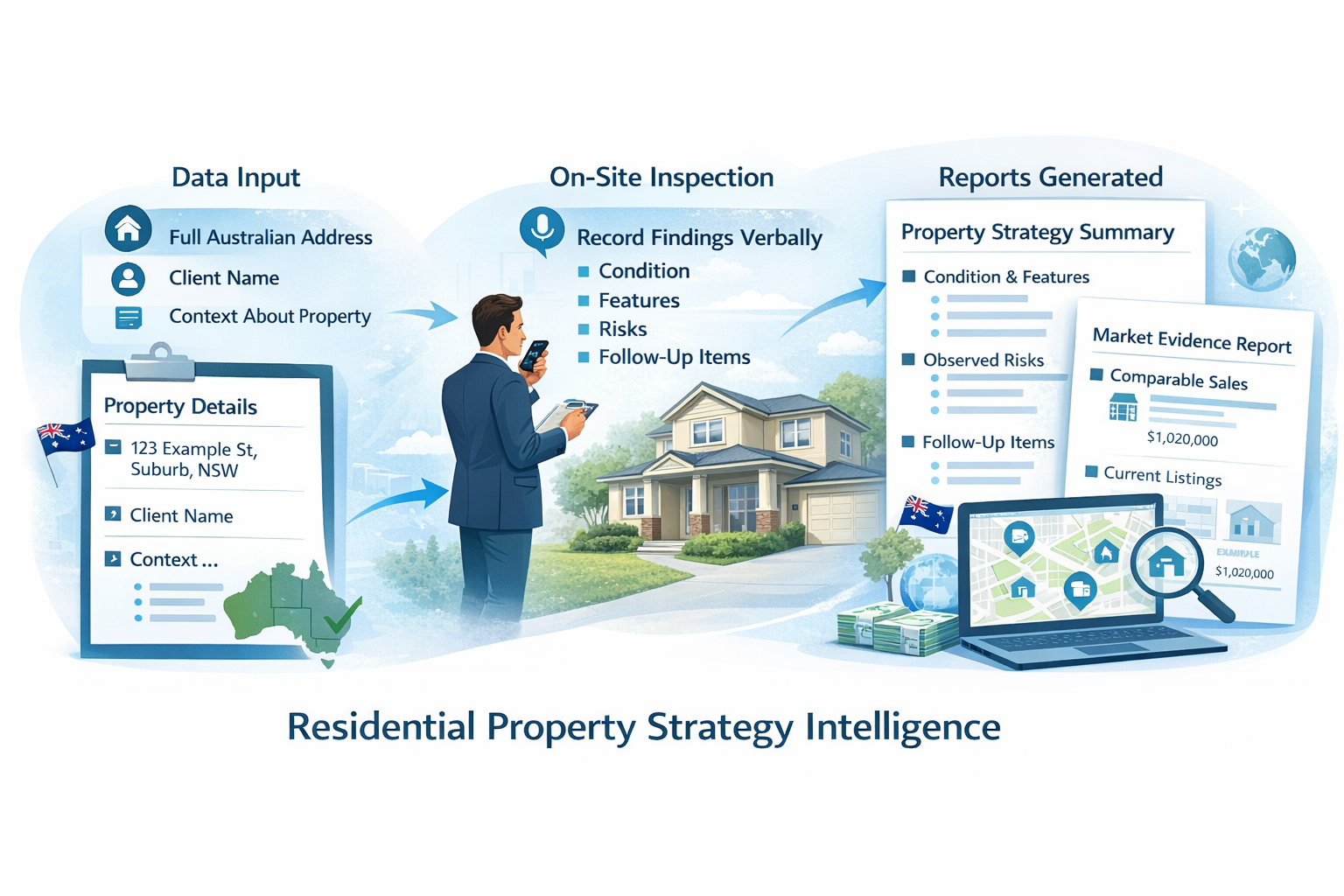
This workflow converts a spoken property walkthrough or inspection recording into structured property documentation. From one recording, it produces two outputs:
• a property inspection and strategy summary
• a separate market evidence and pricing context report
What to provide:
When recording your walkthrough, include:
• the full property address
• key observations about the condition and layout
• notable features and issues
• relevant context (for example: selling, buying, or due diligence)
Providing the address allows the system to generate market-relevant pricing and evidence summaries correctly.
What you get:
• Property strategy and sale-readiness summary
• Market evidence and pricing context report
• Clean, client-ready written outputs
This product is designed for visual inspections and observational reporting rather than precise measurements.
LectureLedger – Lecture Transcript to Structured Notes
Description:
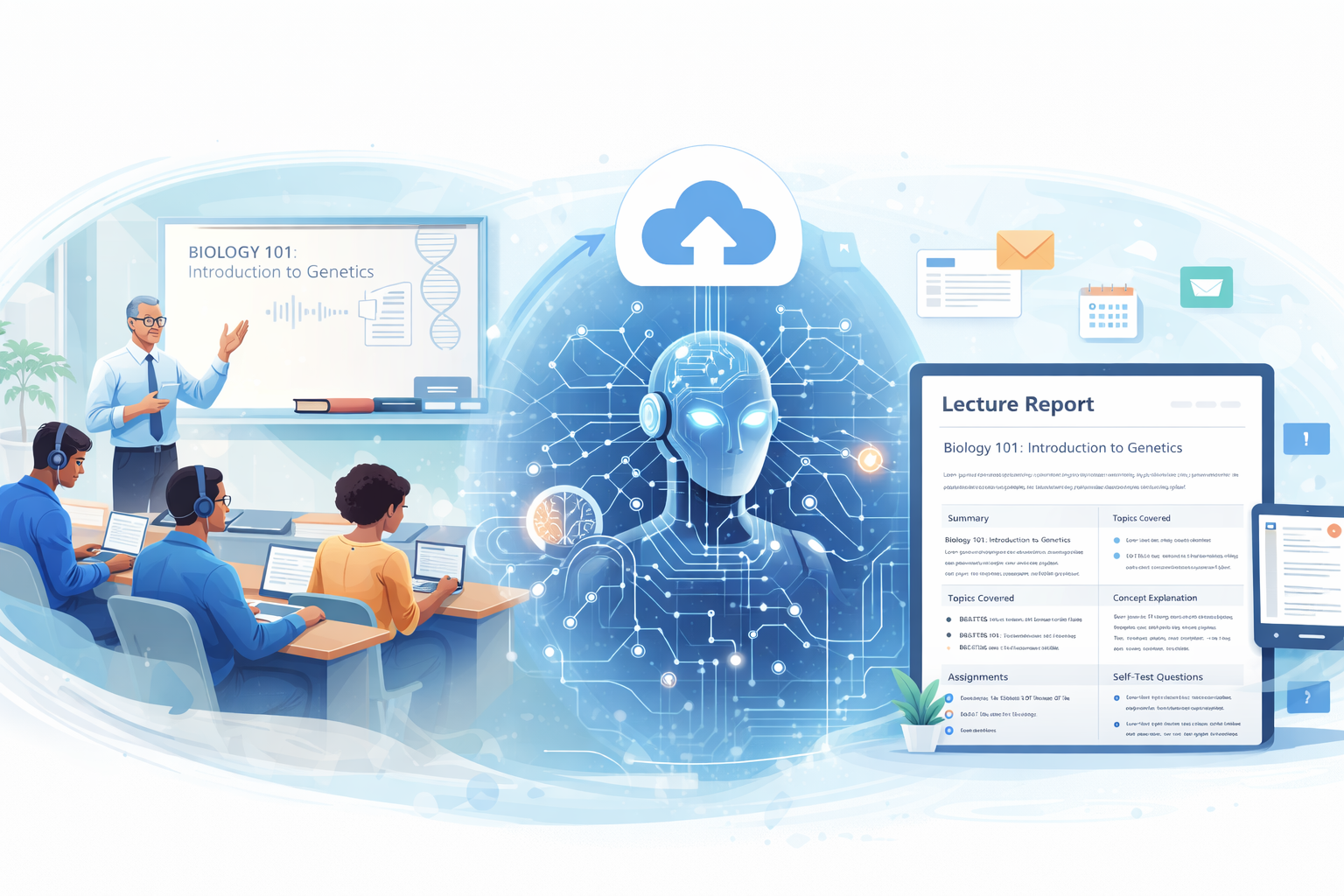
This workflow converts lecture recordings or transcripts into structured lecture notes. It organises spoken material into readable sections suitable for study, review, or sharing.
What to provide:
Upload a lecture recording or transcript. Speak or record naturally during the lecture. No special formatting is required.
What you get:
• Structured lecture notes
• Topic sections and summaries
• Clear written outputs for reference or study
This product is suitable for educational content where spoken material needs to become organised written notes.
Customised for your business
〰️
Reports shaped to your workflow
〰️
Your language. Your structure.
〰️
Outputs that fit your process
〰️
Built for how you work
〰️
Documentation that matches your needs
〰️
Customised for your business 〰️ Reports shaped to your workflow 〰️ Your language. Your structure. 〰️ Outputs that fit your process 〰️ Built for how you work 〰️ Documentation that matches your needs 〰️
Context Intelligence Engine
Turn complex documents into clear, decision-ready insights
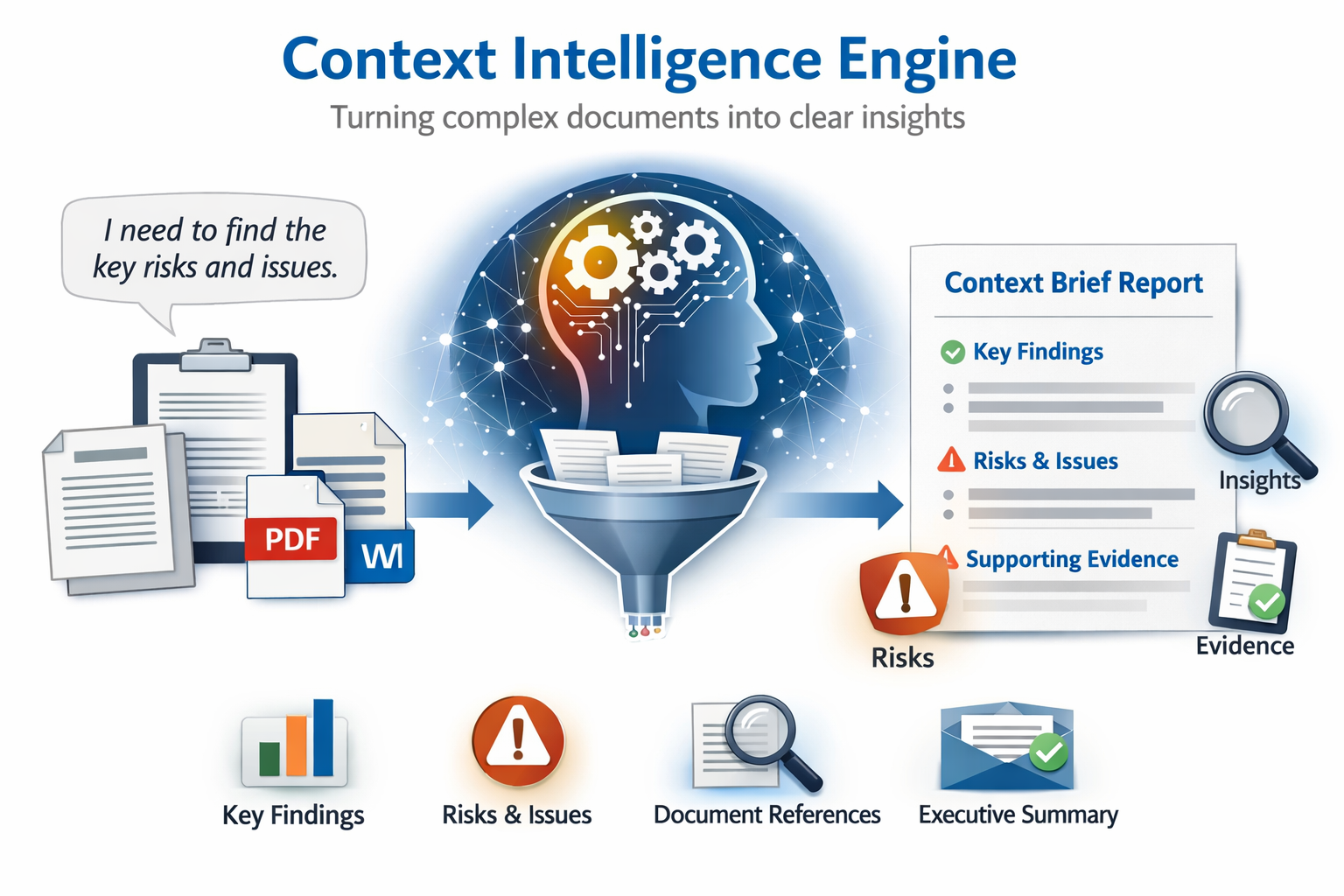
The Context Intelligence Engine helps you quickly understand what matters inside complex documents — without reading hundreds of pages or guessing what’s important.
You simply explain what you’re trying to understand and upload your document. The system does the rest.
First, it reads your request to understand your intent — what you’re looking for, what type of insight you need, and how detailed the analysis should be.
Next, it reviews your document strictly through that lens, extracting only the information that directly relates to your question.
The result is a structured Context Brief that highlights key findings, trends, risks, and supporting evidence — all clearly referenced back to the original document pages.
Finally, everything is delivered in a professionally formatted email designed for executive review, making it easy to read, share, and act on.
What you provide
A short written or spoken request explaining what you want to understand
One or more documents (PDF or Word)
What you receive
A clear, structured Context Brief
Key findings relevant to your question
Identified risks, limitations, or considerations
Supporting evidence with page references
A professional, executive-ready email summary
When this is useful
Reviewing reports, policies, or research documents
Understanding risks or implications buried in long documents
Preparing executive summaries without manual analysis
Gaining clarity before making decisions or seeking professional advice
Important to know
This tool provides context and clarity, not advice.
It explains what the document says and allows, not what you should do.
The engine shown here is a general use case. It can be customised to suit specific document types, industries, or analysis goals, depending on the level of detail and structure you need.
Policy & Standards Alignment Engine
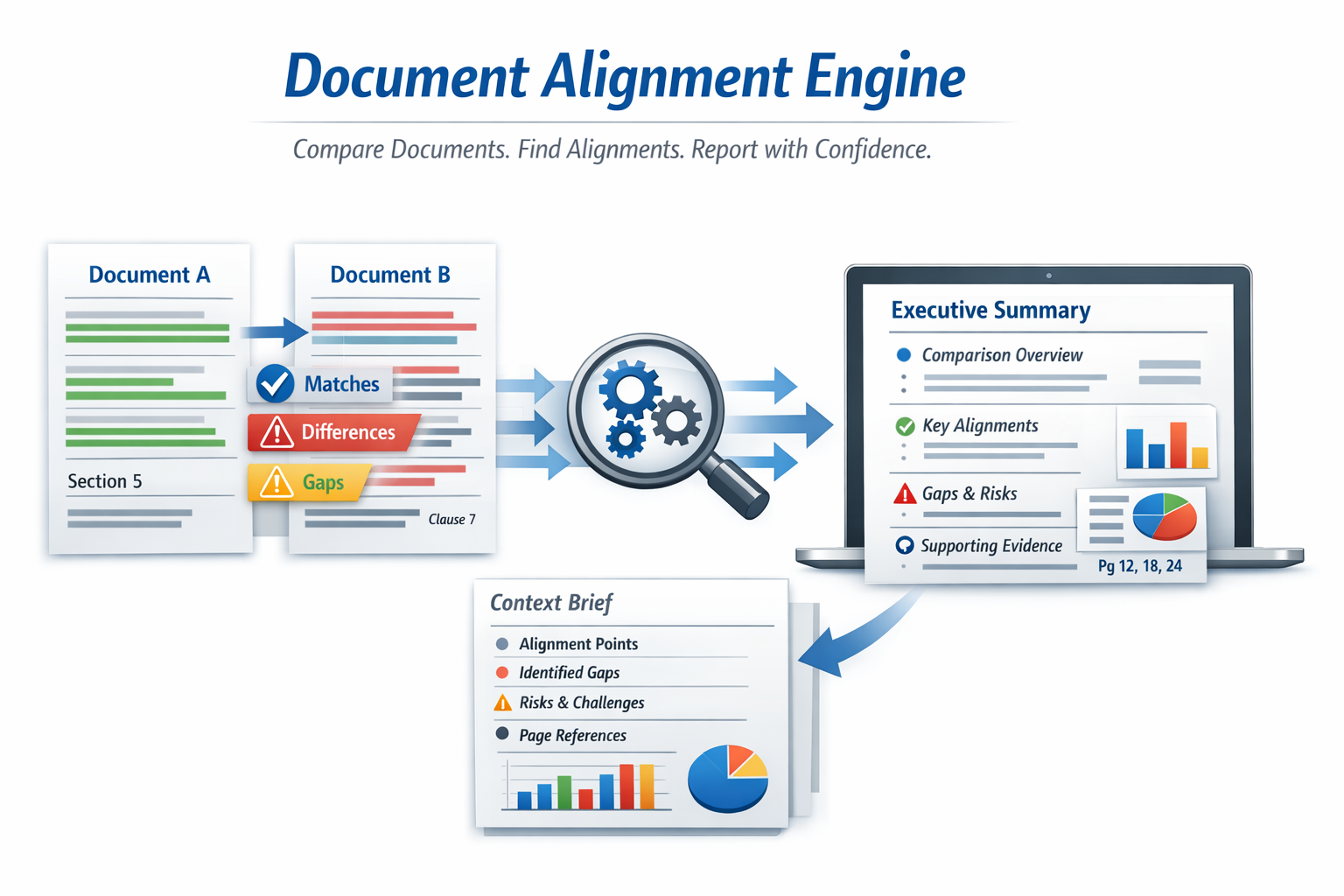
Compare two complex documents and see where they truly align
The Document Alignment Engine helps you understand how one document measures up against another — quickly, clearly, and without manually reviewing hundreds of pages.
Whether you’re checking an internal policy against a regulation, comparing two standards, reviewing contracts, or assessing alignment between frameworks, this tool shows you exactly where they match, where they differ, and where limitations exist.
You simply explain what you want to assess and upload your documents.
First, the system clarifies your objective — what kind of comparison you need and how detailed the review should be.
Next, it analyses both documents side by side, extracting only the information relevant to your goal.
It identifies alignment points, gaps, risks, and key structural differences — all clearly traceable back to specific page references.
The result is a structured executive brief delivered in a professional, easy-to-read format that’s ready to share with leadership, compliance teams, or stakeholders.
What you provide
• A short written or spoken request explaining what you want to compare
• Two documents (PDF or Word)
What you receive
• A clear comparison summary
• Identified alignment points
• Highlighted gaps or differences
• Risks, limitations, and structural distinctions
• Page-referenced evidence for transparency
• A professionally formatted executive email summary
When this is useful
• Comparing internal policies against regulations
• Reviewing contracts side by side
• Assessing alignment between standards or frameworks
• Preparing compliance review summaries
• Conducting due diligence or governance reviews
Important to know
This tool provides structured clarity and comparison — not legal advice or certification.
It explains what the documents state and how they relate to each other, helping you make informed decisions or prepare for further review.
The engine shown here represents a general comparison use case. It can be customised for specific industries, document types, or regulatory environments depending on your requirements.